
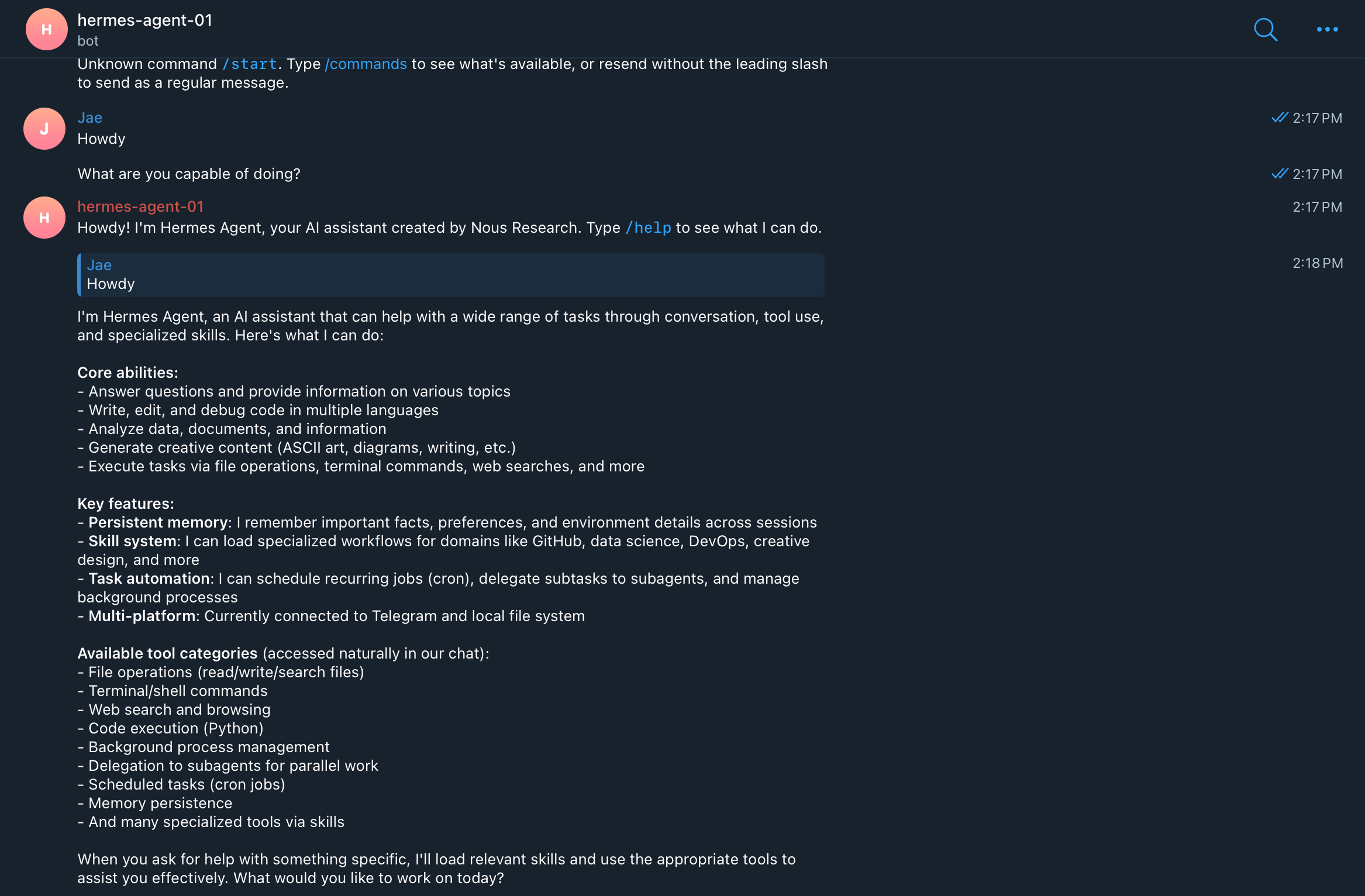
I learned something simple while building and testing AI agents: the setup cost matters more than we like to admit.
I already use AI agents through public apps such as Claude, Codex, and Manus AI. I also build standalone AI agents for specific verticals, and custom modules including a persistent memory layer that connects multiple agents to a centralized long-term memory. But when I am experimenting, testing customer workflows, or preparing consulting demos, I cannot afford to rebuild the same environment again and again.
So I standardized the process. For my current workflow, the answer is a Hermes Agent on Replit, connected through a dedicated Telegram bot.
Hermes Agent is an open-source agent framework from Nous Research, available on GitHub. Replit gives me a fast browser-based development environment where I can create a clean Python project, run shell commands, and quickly duplicate the pattern for additional agents.
If you do not already have a Replit account, you can use my referral link, https://replit.com/refer/leejaew, and receive an additional $10 in credits when you upgrade to a Replit Core plan. The goal is not to build the final production architecture. The goal is to create a dependable default state that I can fire up in minutes.
The old way was to rebuild each agent manually, troubleshoot environment issues from memory, and open multiple tools just to test one conversation. The standardized way is simpler: start from one repeatable setup pattern, use the same installation and recovery commands each time, and talk to each agent through a dedicated Telegram bot.
Below is the exact process I use. It is intentionally practical. You can copy the prompt and command blocks directly.
(Video: Installing Hermes agent on a new Replit environment in less than 5 minutes)
The setup
Start by creating a new Replit project. I recommend using a clean project for each agent, especially if you plan to create multiple agents for different experiments, customers, or use cases. Go to Replit, log in, and paste this into the main Replit creation chat box:
Create a clean, blank Python 3 project. No web app, no Node.js, no frameworks. Just a basic Python environment with full shell access. Name it "hermes-agent-01"If you are creating multiple agents, keep the naming predictable. For example, use hermes-agent-01, hermes-agent-02, and hermes-agent-03. This small naming discipline helps more than people think when you are managing many experiments at once.
Before you configure the Hermes gateway, you also need a Telegram bot. Telegram bots are created through BotFather, the official Telegram bot used to create new bot accounts and manage existing ones. Telegram’s own bot tutorial explains that obtaining a token is done by contacting BotFather, issuing the /newbot command, and following the prompts until BotFather gives you a new token. Start a chat with BotFather and send /newbot. Give the bot a display name, such as Hermes Agent 01. This is the name people will see. Give the bot a username ending in bot, such as hermes_agent_01_bot. This becomes the bot handle. Copy the bot token BotFather gives you and save it securely, because it works like a password.
For the LLM provider, this tutorial uses OpenRouter, and you can create your API key at https://openrouter.ai/workspaces/default/keys. The model used here is nvidia/nemotron-3-super-120b-a12b:free, a free OpenRouter model listed as NVIDIA Nemotron 3 Super, a 120B-parameter open hybrid MoE model that activates 12B parameters and offers a 1M token context window. I chose this setup because it fits the purpose of this Hermes Agent workflow: low-cost experimentation, enough context for multi-step agent behavior, and a simple provider layer that lets me test or swap models without rebuilding the entire agent environment.
The problem
The main issue with lightweight agent experimentation is not the first installation. The first installation is usually fine.
The real problem appears later. You reopen a project and the environment path is missing. A database file gets into a bad state. A gateway process is still running somewhere. A Telegram connection needs to be restarted. You cannot tell whether the agent is down, the gateway is down, or the model configuration is wrong.
This is partly because I am using Replit here as a fast Shell-based experimental environment, not as a formally published web service. I am not deploying Hermes behind a production web endpoint, custom domain, process manager, health check, and release pipeline. I am using the Replit workspace as a lightweight place to install Hermes, run commands, connect a Telegram gateway, and test agent behavior quickly.
That choice is intentional, but it has trade-offs. A Shell-based workflow is fast and flexible, but it is not the same as a managed service deployment. When a workspace restarts or a new shell opens, environment paths, aliases, background processes, and runtime assumptions can be lost or become inconsistent. That is why I created the setup and recovery commands. They compress the fragile parts into a repeatable sequence.
These are not exciting problems. But they are the problems that waste real founder time.
The setup below handles four things. First, it installs Hermes Agent, creates the virtual environment, and adds a convenient launcher command. Second, it reloads Replit environment settings whenever a new shell opens. Third, it creates repeatable restore and recovery commands so the agent can return to a known working state. Finally, it starts the Telegram gateway in a restart loop so the bot can recover from simple process failures.
The point of the one-command recovery pattern is not to pretend this is production infrastructure. It is to make a Shell-based experimental environment predictable enough for testing, demos, and early consulting conversations. If the agent breaks, I do not want to manually remember eight commands. I want one command that restores the environment, checks Hermes, resets the local database when needed, reconnects the gateway, stops stale processes, and starts the bot again.
The resolution
Once the Replit project is created, open the Shell and run the following installation block once per project.
Step 1: run the full initial installation
This installs uv, downloads Hermes Agent from GitHub, creates a clean Python virtual environment, installs Hermes with all optional dependencies, and creates a hermes shortcut command.
rm -rf ~/workspace/hermes-agent ~/.hermes 2>/dev/null || true

curl -LsSf https://astral.sh/uv/install.sh | sh

source $HOME/workspace/.local/bin/env
export PATH="$HOME/workspace:$HOME/.local/bin:$PATH"
export UV_PYTHON_DOWNLOADS=manual

git clone https://github.com/NousResearch/hermes-agent.git ~/workspace/hermes-agent
cd ~/workspace/hermes-agent

rm -rf .venv
uv venv .venv --clear
uv pip install -e ".[all]"

cat > ~/workspace/hermes << 'EOF'
#!/bin/bash
export PATH="$HOME/workspace:$HOME/.local/bin:$PATH"
export UV_PYTHON_DOWNLOADS=manual

cd ~/workspace/hermes-agent || {
    echo "Cannot find hermes-agent folder!"
    exit 1
}

if [ -f ".venv/bin/python" ]; then
    .venv/bin/python -m hermes_cli.main "$@"
else
    echo "Venv missing!"
fi
EOF

chmod +x ~/workspace/hermes
echo "Hermes installed successfully!"
I removed decorative symbols from the command outputs because some environments handle text encoding differently. The functional result is the same.
Step 2: initialize every new shell
Replit may not preserve every path and environment setting the way you expect. Whenever you open a new Shell, run this block first.
source $HOME/workspace/.local/bin/env
export PATH="$HOME/workspace:$HOME/.local/bin:$PATH"
export UV_PYTHON_DOWNLOADS=manual
alias hermes="~/workspace/hermes"

echo "Hermes environment ready"
hermes --version
This is one of the small steps that prevents unnecessary confusion. If the hermes command is not available, the rest of the setup becomes harder to diagnose.
Step 3: configure Hermes
Now configure the agent, the model provider, the tools, and the Telegram gateway.
hermes setup
hermes model           # Choose OpenRouter and paste your API key when prompted
hermes tools           # Enable the tools you want Hermes to use
hermes gateway setup   # Paste the Telegram bot token from BotFather when prompted
For my own use, Telegram is the simplest default interface because it gives each agent a dedicated conversational endpoint. I can test agent behavior from my phone, share a bot with a specific collaborator when appropriate, and separate one agent from another without opening a full development environment.
The setup sequence is simple in practice. Your LLM API key comes from your model provider, such as OpenRouter, and goes into hermes model. The Hermes tool configuration is handled through hermes tools. The Telegram bot token comes from BotFather after /newbot, and goes into hermes gateway setup. After that, your dedicated Telegram bot chat becomes the place where you talk to Hermes.
Once this is connected, the Telegram bot becomes the conversational front door to the Hermes agent.
Step 4: fix and initialize the Kanban database
On Replit, I have seen database-related issues appear during agent setup or restart. This block removes the old Kanban database files and initializes a fresh one.
rm -rf ~/.hermes/kanban.db ~/.hermes/kanban.db.* 2>/dev/null || true
mkdir -p ~/.hermes
hermes kanban init
This is not glamorous, but it is exactly the kind of defensive command that makes the setup feel reliable.
Step 5: create the quick restore script
This creates a lightweight maintenance script that reloads the environment, runs Hermes doctor with fixes, resets the Kanban database, and checks the final state.
cat > ~/workspace/restore-hermes.sh << 'EOF'
#!/bin/bash
echo "========================================"
echo "Hermes Quick Restore Tool"
echo "========================================"

source $HOME/workspace/.local/bin/env
export PATH="$HOME/workspace:$HOME/.local/bin:$PATH"
export UV_PYTHON_DOWNLOADS=manual
alias hermes="~/workspace/hermes"

hermes doctor --fix

rm -rf ~/.hermes/kanban.db ~/.hermes/kanban.db.* 2>/dev/null || true
mkdir -p ~/.hermes
hermes kanban init

hermes doctor
echo "Quick Restore Completed!"
EOF

chmod +x ~/workspace/restore-hermes.sh
Step 6: create the main recovery command
This is the command I care about most after the first installation. It re-runs the restore script, reconfigures the Telegram gateway, stops old gateway processes, creates a persistent gateway runner, and starts it in the background.
I created this command because a Replit Shell session is not the same thing as a published web service. In a published service, I would expect the platform to manage startup behavior, process supervision, routes, and restarts more formally. In this setup, I am intentionally keeping Hermes as a fast experimental agent inside the workspace. That means the recovery command has to do the operational housekeeping for me.
The command below does four practical things in one motion. It reloads paths and environment settings so hermes does not disappear in a fresh shell. It repairs common Hermes issues so I spend less time troubleshooting before demos or tests. It stops stale gateway processes so multiple sessions do not compete with each other. It also starts a looped gateway runner so the Telegram bot can recover after simple failures.
cat > ~/workspace/hermes-recover << 'EOF'
#!/bin/bash
echo "========================================"
echo "Hermes Full Recovery (hermes-recover )"
echo "========================================"

source $HOME/workspace/.local/bin/env
export PATH="$HOME/workspace:$HOME/.local/bin:$PATH"
export UV_PYTHON_DOWNLOADS=manual
alias hermes="~/workspace/hermes"

~/workspace/restore-hermes.sh

echo "Re-configuring Telegram Gateway..."
hermes gateway setup

echo "Cleaning old processes..."
hermes gateway stop 2>/dev/null || true
pkill -f start-gateway.sh 2>/dev/null || true

echo "Starting Persistent Gateway..."
cat > ~/workspace/start-gateway.sh << 'INNEREOF'
#!/bin/bash
while true; do
    echo "[$(date '+%Y-%m-%d %H:%M:%S')] Hermes Gateway starting..." >> ~/workspace/gateway.log
    hermes gateway run >> ~/workspace/gateway.log 2>&1
    echo "[$(date '+%Y-%m-%d %H:%M:%S')] Gateway stopped. Restarting in 5s..." >> ~/workspace/gateway.log
    sleep 5
done
INNEREOF

chmod +x ~/workspace/start-gateway.sh
nohup ~/workspace/start-gateway.sh > ~/workspace/gateway-daemon.log 2>&1 &

echo "FULL RECOVERY COMPLETED! Bot should now respond."
EOF

chmod +x ~/workspace/hermes-recover
echo "hermes-recover command created!"
After this, the most important command becomes simple.
hermes-recoverThat command gives me a repeatable way to bring the agent back into a working state. For founder workflows, repeatability is often more valuable than elegance.
This is also why I think about the setup as a launch routine rather than a deployment. A deployment is something I would harden, monitor, version, and expose as a service. A launch routine is something I can run quickly when I need another agent for learning, testing, or a customer conversation. The distinction matters because it keeps the architecture honest.
Step 7: back up the agent configuration
Once the agent is working, create a backup.
cd ~/workspace && zip -r hermes-backup.zip hermes-agent .hermesIf you need to restore from the backup later, run:
cd ~/workspace
unzip -o hermes-backup.zip
hermes-recover
The backup is useful when Replit storage behaves unexpectedly or when you want to preserve a working configuration before changing tools, models, or gateway settings.
Step 8: monitor live logs
When something goes wrong, do not guess. Watch the logs.
tail -f ~/workspace/gateway.logOther useful checks are:
tail -n 100 ~/workspace/gateway.log
hermes gateway status
ps aux | grep -E 'hermes|gateway'
Step 9: check if Hermes is running
Use this when you want a quick status check.
hermes gateway status

ps aux | grep -E 'hermes|gateway|start-gateway' | grep -v grep
Step 10: stop all Hermes processes cleanly
If you need to reset the gateway, stop everything first.
hermes gateway stop 2>/dev/null || true
pkill -f start-gateway.sh 2>/dev/null || true
pkill -f "hermes_cli.main gateway" 2>/dev/null || true

echo "All Hermes processes stopped."
Step 11: start Hermes as a persistent service
After installation, configuration, or recovery, the cleanest command is still:
hermes-recoverThat starts the persistent gateway loop and keeps the Telegram bot reachable.
My daily workflow
Once the project is set up, my daily workflow is intentionally boring. When I open the Replit project, I run the new shell initialization block. When I need to restart the agent and gateway, I run hermes-recover. When I want to see what is happening, I run tail -f ~/workspace/gateway.log. When I need to stop everything cleanly, I run the clean stop command. When I need the next agent, I duplicate the process with the next project name.
This is the part I wish more founders paid attention to. The system does not become useful because the setup is clever. It becomes useful because the setup becomes boring enough to trust. When you are exploring agent workflows, you need room for mistakes. You need to test prompts, tools, memory, handoffs, customer workflows, and failure modes. If the infrastructure itself is always unpredictable, you lose the patience required to learn what actually matters.
For me, this Hermes on Replit pattern is not the final architecture. It is the fast experimental layer. It lets me spin up a focused agent, connect it to Telegram, test a workflow, and decide whether the idea deserves more investment.
That is the founder pattern underneath this post.
Do not overbuild the thing you have not yet learned from.
First, make it repeatable. Then make it useful. Then make it durable.